Working with labware and deck configuration
Understanding labware and deck configuration is essential for creating and running protocols on the Prep. This guide explains how to query available labware, understand labware properties, work with deck positions, and manage labware in protocols via the API.
Before creating protocols, familiarize yourself with the available labware in your system and their properties to ensure that the appropriate labware is selected for your application.
About labware
Labware represents the physical plates, tip racks, and other items used on the Prep deck. Each labware item has specific properties that define its characteristics and capabilities.
Key concepts
When working with labware via the API:
Name vs DisplayName: The Name field is the unique identifier used in API calls, while DisplayName is the human-readable name for display purposes.
ID-based references: Each labware has a unique numeric ID that can be used to reference it.
Classification: Labware is categorized by type (e.g., Plate, TipRack, Trough) which determines how it can be used in protocols.
Dimensions: The Rows and Columns properties define the grid layout (e.g., 8×12 for a 96-well plate).
Volume capacity: The Volume property indicates the capacity of wells or containers.
For a complete list of labware properties, refer to the LabwareSummaryDto and LabwareDto schemas in the ML Prep OpenAPI documentation.
Retrieving labware information
Get all available labware
Retrieve the complete catalog of labware available in your system using the GetLabware endpoint. This returns a summary of all labware with their IDs, names, classifications, and key properties.
The labware catalog can contain many items, which may slow down the call. Cache this data, when possible, to regularly access the list of all labware.
Use this endpoint to:
Discover available labware before creating protocols.
Build a labware selection interface in your application.
Filter labware by classification or other properties.
Populate a local cache of available labware.
- Mock server
http://{{your_prep_ip_address}}/api/v1/labware
- curl
- JavaScript
- Node.js
- Python
- Java
- C#
- PHP
- Go
- Ruby
- R
- Payload
curl -i -X GET \
  'http://{{your_prep_ip_address}}/api/v1/labware' \
-H 'Authorization: Bearer <YOUR_JWT_HERE>'[ { "id": 0, "name": "string", "containerName": "string", "rows": 0, "columns": 0, "volume": 0.1, "displayName": "string", "imageExtension": "string", "imageData": "string", "partNumbers": "string", "categories": [ … ], "classification": "string", "siteAlignments": [ … ], "isFavorite": true, "parts": [ … ] } ]
Get labware by name
After accessing the specific labware name, use the GetLabwareByName endpoint to retrieve its details directly.
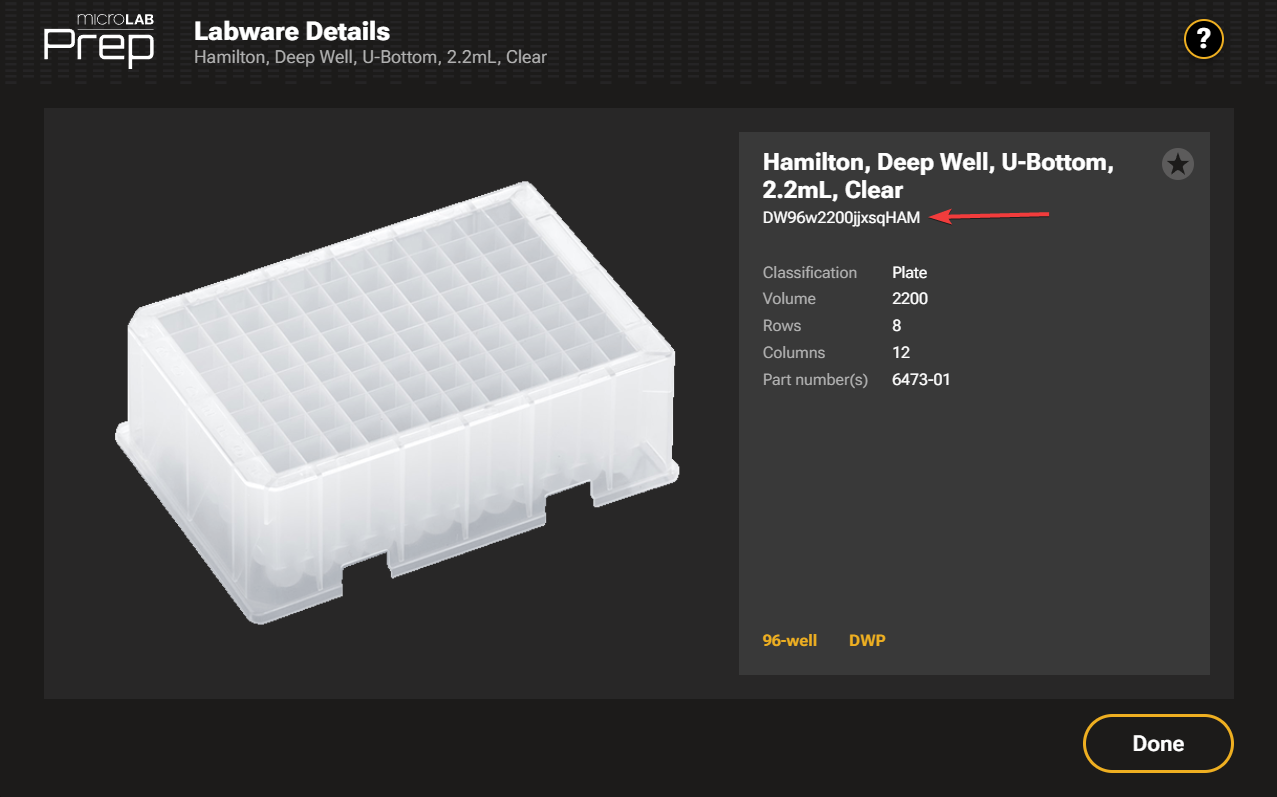
The name must match exactly as it appears in the system. This endpoint is useful when:
A labware name in the Prep software is known.
Using standardized labware across multiple protocols.
Validating that a specific labware exists.
- Mock server
http://{{your_prep_ip_address}}/api/v1/labware/by-name/{name}
- curl
- JavaScript
- Node.js
- Python
- Java
- C#
- PHP
- Go
- Ruby
- R
- Payload
curl -i -X GET \
  'http://{{your_prep_ip_address}}/api/v1/labware/by-name/{name}' \
-H 'Authorization: Bearer <YOUR_JWT_HERE>'{ "id": 0, "name": "string", "containerName": "string", "rows": 0, "columns": 0, "volume": 0.1, "displayName": "string", "partNumbers": "string", "categories": [ { … } ], "classification": "string", "siteAlignments": [ "string" ], "isFavorite": true, "parts": [ { … } ] }
Get labware by ID
After accessing the numeric labware ID, use the GetLabwareById endpoint to retrieve the full labware details.
This is the preferred method when:
Labware IDs were cached from a previous catalog query.
Labware references are stored in your application.
- Mock server
http://{{your_prep_ip_address}}/api/v1/labware/{id}
- curl
- JavaScript
- Node.js
- Python
- Java
- C#
- PHP
- Go
- Ruby
- R
- Payload
curl -i -X GET \
  'http://{{your_prep_ip_address}}/api/v1/labware/{id}' \
-H 'Authorization: Bearer <YOUR_JWT_HERE>'{ "id": 0, "name": "string", "containerName": "string", "rows": 0, "columns": 0, "volume": 0.1, "displayName": "string", "partNumbers": "string", "categories": [ { … } ], "classification": "string", "siteAlignments": [ "string" ], "isFavorite": true, "parts": [ { … } ] }
About deck positions
The Prep deck consists of eight positions arranged in a specific layout. When creating protocols via the API, specify which labware occupies each deck position.
Deck layout
Deck positions are numbered from 1 to 8:
Positions 1-4: Left column (top to bottom)
Positions 5-8: Right column (top to bottom)
Not all positions need to be filled for every protocol. Exclude any empty positions from the deck configuration.
Planning the deck layout
Consider the following when planning the deck configuration programmatically:
Physical restrictions: Some labware have specific placement requirements (e.g., tip pedestals for framed tip racks).
Accessibility: Consider pipetting head movement patterns for efficient access to frequently used labware.
Working with labware in protocols
When creating a protocol via the API, specify the deck configuration, including which labware is placed at each position.
Labware groups
Labware groups are containers that associate labware with additional metadata and configuration. Every labware placed on the deck must be part of a labware group, even if it's a single item.
For tip racks, labware groups are commonly called "tip groups" and have special significance for tip reuse behavior. Go to Working with tip groups for more information.
Deck configuration structure
The deck configuration consists of an array of positions, each containing:
Position: The deck position number (1-8).
PositionName: A descriptive name for the position in this protocol.
LabwareGroup: The labware group object containing the labware and its configuration.
LiquidVolume: The amount of liquid in the position.
LabwarePositions: For tube racks or trough carriers, this array represents each slot for tubes or troughs.
Refer to the DeckPositionPostPutDto and LabwareGroupPostPutDto schemas in the ML Prep OpenAPI documentation for details.
Example: Creating a protocol with labware
When creating a protocol, specify labware groups for each occupied deck position:
 {
  "name": "Sample Protocol",
  "deck": {
   "positions": [
    {
     "position": 2,
     "positionName": "Tip Rack",
     "labwareGroup": {
      "groupName": "300uL Tips",
      "labwareId": 123,
      "reuseTipsBetweenSteps": false
     }
    },
    {
     "position": 6,
     "positionName": "Reagent Resevior",
     "labwareGroup": {
      "groupName": "reagent",
      "labwareId": 456,
      "liquidName": "reagent",
      "liquidType": "Aqueous"
     }
    }
   ]
  }
 }
For detailed examples of protocol creation workflows, go to Create a Prep protocol.
Best practices
When working with labware and deck configuration via the API:
Cache labware data: Query the labware catalog once and cache the results to reduce API calls and improve performance.
Check labware properties: Verify that labware dimensions and volume capacity match your protocol requirements.
Consider physical constraints: Be aware of labware-specific placement requirements.